Custom ticket panels
Build separate entry points for support, reports, applications, billing, or anything else your community needs.
Turn scattered help requests into private, organized conversations. TicketBot combines custom panels, structured forms, transcripts, and a polished web dashboard—without putting the essentials behind a paywall.
Live support queue
12
Open
4m
First reply
94%
Resolved
Purchase not showing
#1842Billing team · just now
Account verification
#1841General team · just now
Appeal review
#1839Moderation team · just now
Synced with Discord in real time
ConnectedThe simple explanation
In an ordinary Discord help channel, requests get buried, multiple staff members answer at once, and nobody can tell which problems are still waiting. A ticket bot replaces that noise with one private conversation per request.
When a member clicks a button, TicketBot opens a private channel or thread for them and the right staff team. The team can claim the request, respond, transfer it, and close it when the work is done. A transcript is kept automatically.
Member asks
One clear entry point
01Ticket routes
Private and organized
02Team resolves
Transcript retained
03Everything in one system
TicketBot covers the full support workflow, while keeping the experience simple for members and predictable for staff.
Build separate entry points for support, reports, applications, billing, or anything else your community needs.
Manage panels, settings, tickets, staff, and transcripts from a workspace built for daily use.
Save every closed conversation online and keep past support easy to find from the dashboard.
Collect account IDs, order numbers, and issue details before a ticket reaches your team.
Choose private channels or scale to as many as 1,000 open thread tickets per panel.
Let staff claim, hand off, and resolve tickets without two people answering the same request.
Run the full member-facing flow in English, German, French, Spanish, Portuguese, Dutch, Luxembourgish, or Arabic.
Understand response times, ticket volume, and team activity instead of guessing where support slows down.
Close inactive tickets after a timeframe you choose and keep the queue focused on active conversations.
Dashboard included
Build panels with live previews, manage open tickets, search transcripts, change permissions, and understand team performance without memorizing a catalog of commands.
Explore the dashboard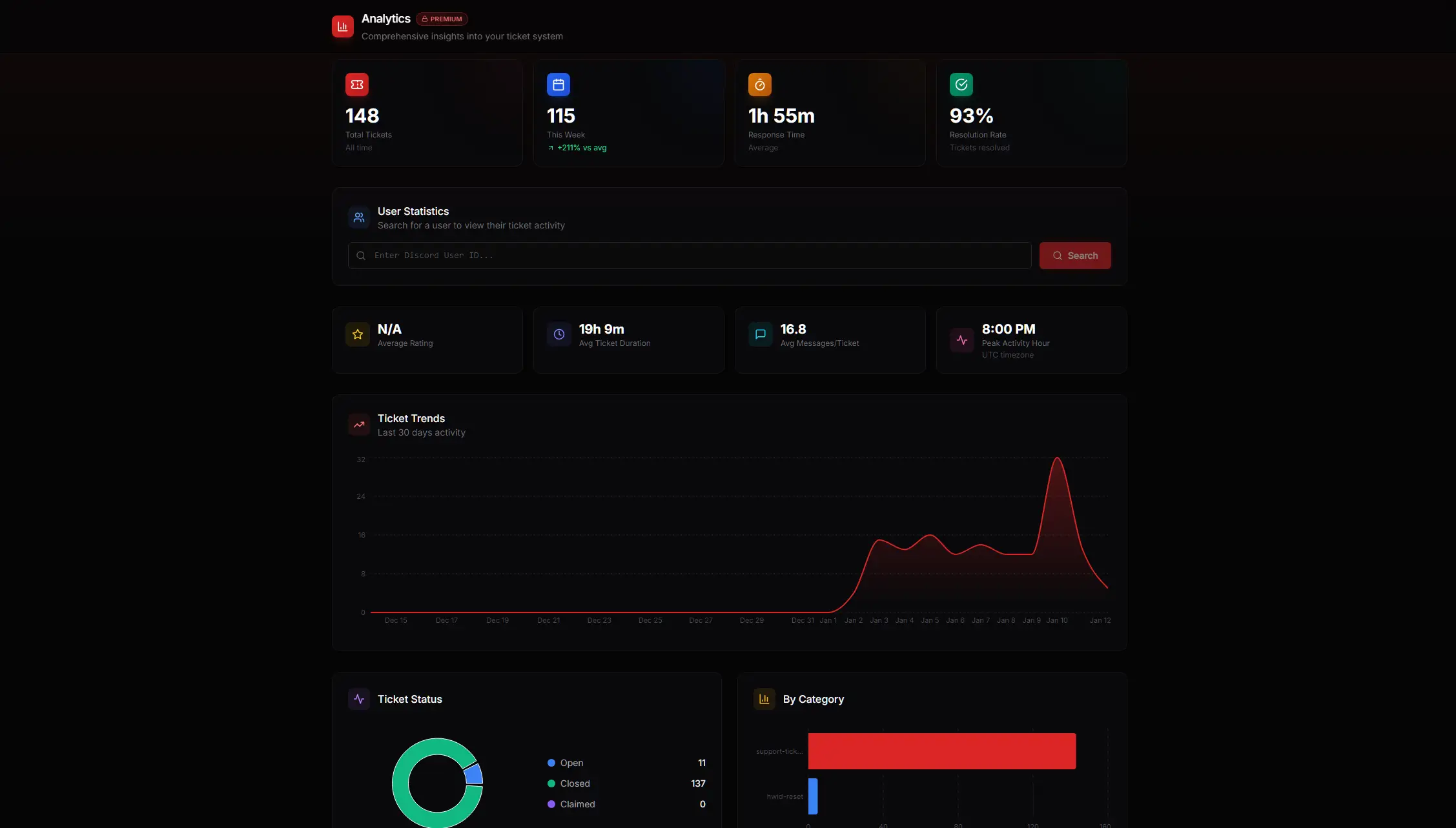
Set up once
Choose your Discord server and authorize the permissions needed to manage tickets.
Pick support roles, write the panel, add an intake form, and choose channel or thread mode.
Post the panel to Discord. Members can open private tickets immediately.
Start free. Scale when useful.
Run a complete support workflow for free. Premium adds capacity, analytics, and automation when your operation needs them.
The complete foundation
More control for growing teams
Built for more than support
Route ban appeals, bug reports, staff applications, and player disputes into separate private flows.
Separate sponsorship requests and collaborations from day-to-day community questions.
Collect account details up front, then measure response time and ticket demand.
Give students a private path to tutors or mentors with a record of every interaction.
Questions, answered
Everything worth knowing before you add TicketBot to your server.
A Discord ticket bot creates a private support channel or thread when a member needs help. Staff can claim the ticket, resolve the issue, close it, and retain a transcript without the conversation getting lost in a public help channel.
Invite TicketBot, select your server, and authorize the requested permissions. Then open the web dashboard, choose your server, create a ticket panel, and publish it to a channel. The complete setup normally takes less than a minute.
Yes. The free tier includes unlimited tickets, up to three ticket panels, forms, claiming, transcripts, thread mode, and dashboard access. It is permanent, not a time-limited trial.
Channel tickets create a private Discord channel for each request. Thread tickets create a private thread and scale further—up to 1,000 open tickets per panel—while also allowing closed conversations to be reopened.
Yes. Each panel can have its own support roles, intake form, welcome message, category, permissions, and workflow. That makes it easy to separate general support, reports, billing, and applications.
Yes. TicketBot uses Discord sharding and supports thread-based tickets for high-volume communities. Thread mode avoids the standard channel limit and supports up to 1,000 concurrent tickets per panel.
Every closed ticket generates an online transcript. It can be sent to the member by DM, logged in Discord, and reviewed later from the web dashboard.
TicketBot currently supports eight languages: English, German, French, Spanish, Portuguese, Dutch, Luxembourgish, and Arabic. The bot messages, buttons, and embeds change together.
Add TicketBot, publish your first panel, and replace support-channel chaos with a workflow your whole team can understand.