Inviting the Bot
To get started with adding Tickets to your server, visit ticketsbot.org/invite: you'll be redirected to Discord automatically.
Select Your Server
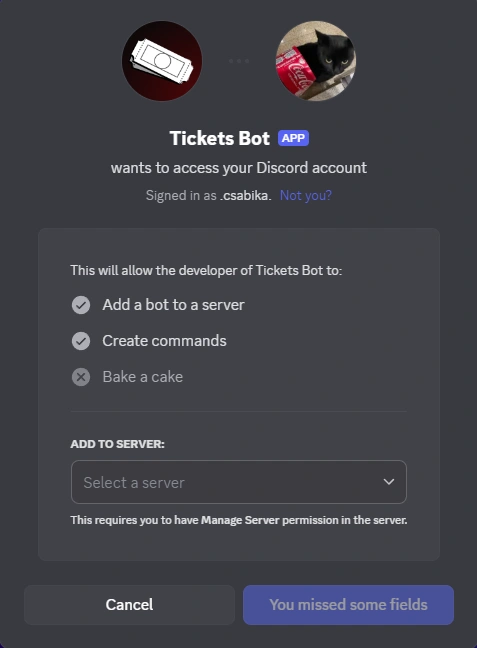
You'll first be asked to select the server you want to add the Tickets bot.
Note: you must have the Manage Server permission to do this.
Authorize the Bot
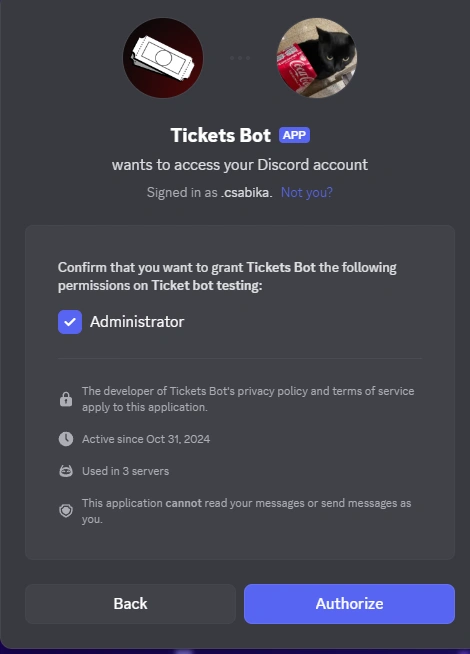
After pressing Continue, you'll be shown that our bot is asking for Administrator permission. It is important that you allow the bot with that permission to ensure the bot can operate normally.
Click Authorize to proceed.
Success!
Discord will then present you with a screen stating that you've authorized the bot: it's now in your server!
Note: If you feel uncomfortable with giving the bot Administrator permissions, you can simply uncheck it, and leave the rest of the permissions on!
Next, let's start configuring the bot: Bot Configuration