2.1.2. Close Requests
Another unique feature of Tickets is close requests.
When you feel a ticket is able to be closed, you can use the /closerequest command to ask the user to confirm they feel everything is resolved:
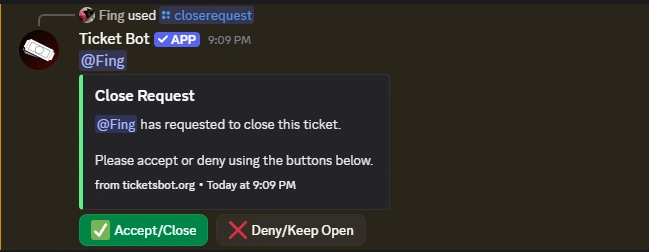
If the user chooses to deny the request, the message will be updated:

Close Delay
Additionally, you can specify a time (in hours) after which the ticket will be closed automatically if the user has not responded, and a reason for closure of the ticket:
Usage: /closerequest [close_delay] [reason]
close_delay- Number of hours (1-24) to wait before auto-closing if no responsereason- Optional reason for closing the ticket
If a close delay is not specified, the ticket will not be closed until the user accepts the request.
Note: If a ticket is excluded from being automatically closed via /autoclose-exclude, close request delays will not apply, even if provided.
How It Works
With Close Delay
If you specify a delay (e.g., /closerequest close_delay:24 reason:Resolved), the ticket will automatically close after the specified number of hours if the ticket opener doesn't respond. If they respond before the delay expires, the auto-close is cancelled.
Without Close Delay
If you don't specify a delay (e.g., /closerequest), the ticket will only close when the user clicks the "Accept/Close" button. The ticket will remain open if they deny the request.